Getting Started
Welcome to the Numerical Electro-Optic Comb Simulator, or NEOS! This tool allows you to simulate
electro-optic frequency combs formed from a combination of cascaded phase and intensity modulators - all
from the comfort of your web browser!
Basic Controls
- Main Tab: Core comb parameters including modulation frequency, RF power, phase
modulator Vπ, and number of modulators
- Optical Tab: Parameters for optical components like the modulator insertion losses, or
the seed laser wavelength and power. These settings only affect the axes, not the shape of the output
spectrum.
- Expert Tab: Advanced controls for intensity modulator adjustment and individual phase
modulator settings. These are important parameters for practical EO combs, but in simulation it's
generally desirable to work with an idealized comb.
- Setup Tab: Simulation settings such as mode number threshold, frequency range, and
sample points. You probably don't want to change these...
Visualization
- Zooming & Panning: Use the scroll wheel to zoom in and out on the plots. Hold down
x to zoom only in the x-direction, or y to zoom only in the y-direction. Click
and drag to pan. Double-click the "Reset Zoom" button on the spectrum plot to restore the original view.
- Spectrum plot: This plot displays the simulated optical frequency comb spectrum based
on the current parameters. You can zoom in and out to explore different parts of the spectrum in detail.
Click the Show/Hide modes button to add markers to comb lines that are within the specified threshold
(default -10 dB relative to peak).
- Temporal field plot: A time trace showing a single RF modulation period. This can be
helpful to understand how the seed laser becomes chirped and modulated by the phase and intensity
modulators
under different conditions. However, note that the carrier frequency is not correct! The difference in
timescales between the optical and modulation frequencies are too high to conveniently plot. Instead,
the visualization uses a carrier frequency that is automatically scaled to match the modulation index,
so that the instantaneous frequency approaches zero at the chirp minimum.
- Temporal envelope plot: A time trace showing the envelope of the optical signal carved
by the
RF signal. Additionally, the compressed pulses are shown, both the Fourier-transform-limited pulse as
well as a
pulse compressed with only beta2. The "beta2" pulse is similar to what compression would look like with
just fiber
or a grating compressor to compensate the dispersion.
What is an Electro-Optic Comb?
An electro-optic (EO) frequency comb is a spectrum of equally-spaced optical frequencies generated by
modulating a continuous-wave (CW) laser with high-speed phase and/or intensity modulators. In general, the
phase modulators serve to create spectral bandwidth by adding sidebands, while the intensity modulator
carves the waveform into temporal pulses.
The core architecture of an EO comb is shown in the figure below. The number of phase modulators can be
increased by serially adding additional modulators to increase the spectral bandwidth. However, this
typically comes at the expense of additional system complexity, cost, and optical insertion loss.
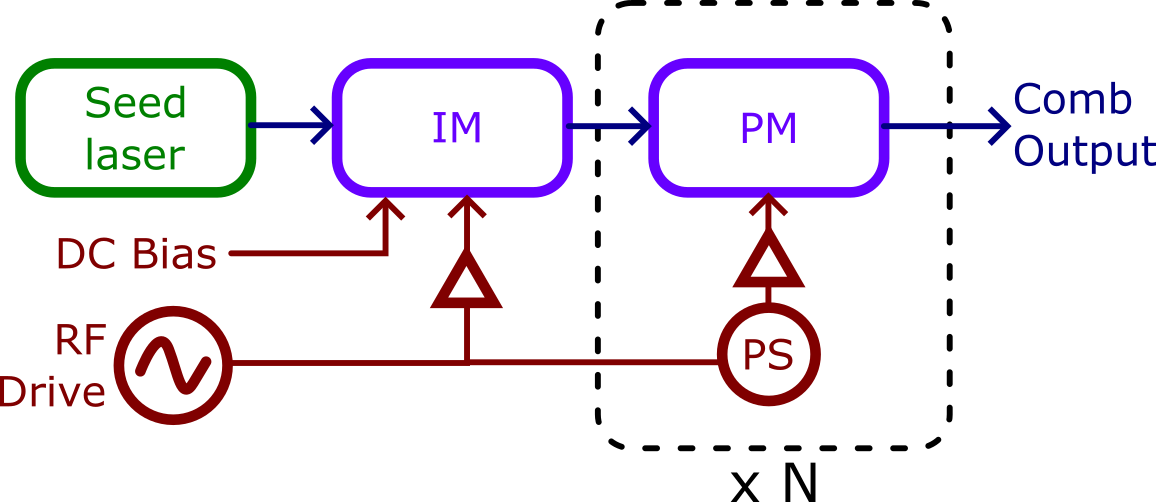
Figure: Basic architecture of an electro-optic
frequency comb.
Can I buy an EO comb?
Absolutely! Octave Photonics offers customized turnkey EO comb systems based on the same
principles simulated in NEOS. Visit octavephotonics.com/geco to learn about our Gigahertz Electro-Optic Comb (GECO)
product line.